On air · 1 of 3 networks
UX Pilot AI
- uxpilot.ai
- US
- 35 employees
UX Pilot AI’s ads on LinkedIn, Meta and Google, recorded by adsrunning. Browse the latest here for free. Sign up free to see all 749. Watch UX Pilot AI with Starter to get each new one in your feed.
Watchlist with Starter · $49/mo
| Network | Status | Live ads | Nov 2025LinkedIn activity · 52 weeksNov 2026 | Checked | Next step |
|---|---|---|---|---|---|
| Running | 198 | Checked 30 Oct 2026 | See all 749 ads → | ||
| Meta | Not checked | — | |||
| Recently | 200+ | Ads on the Google Ads Transparency Center | Checked 14 Oct 2026 | Collect them with the API → |
UX Pilot AI has 198 live LinkedIn ads. We recorded 200+ Google ads on 14 Oct 2026.
Latest ads
- LINKEDIN · VIDEOSince 26 Oct 2026
Which AI Tool Is Best for Design Ideation? I’ve tested two popular options (Claude Design and UX Pilot) using the same scenario: designing a home screen. Here are the results: 🟡 Claude Design Pros: ✅ Claude asked me contextual questions about my design and relied on my answers during the prototyping process. ✅ The tool provided additional details next to each screen, helping me understand the rationale behind the design decisions. Cons: ❌ Claude used my answers to the contextual questions as guidance for the AI. This meant that my answers acted more like constraints, pushing the AI toward a particular UI direction. ❌ There wasn’t much diversity in the outputs. All three designs looked more like recombinations of the same components and patterns. ❌ There was a lack of imagery, which made the UI feel more like a mockup than a finalized design. 🟣 UX Pilot Pros: ✅ It doesn’t require strict directions to create a design. You can start with a basic prompt and still get an interesting result. ✅ It creates the UI in real time, which makes it feel like you’re watching a UI designer at work. ✅ It adds images to the layout, making the design feel more finished. Cons: ❌ The design output can sometimes feel more mid-fidelity than high-fidelity. In other words, it occasionally lacks the level of visual polish you would expect from a finished UI design. 🏆 Winner I think UX Pilot AI is better for design ideation tasks when you need more creative exploration and want to compare different visual directions side by side. 👉 Check UX Pilot https://uxpilot.ai #ui #uidesign #ai #aidesign #productdesign #uxdesign #ux
- LINKEDIN · IMAGESince 25 Oct 2026
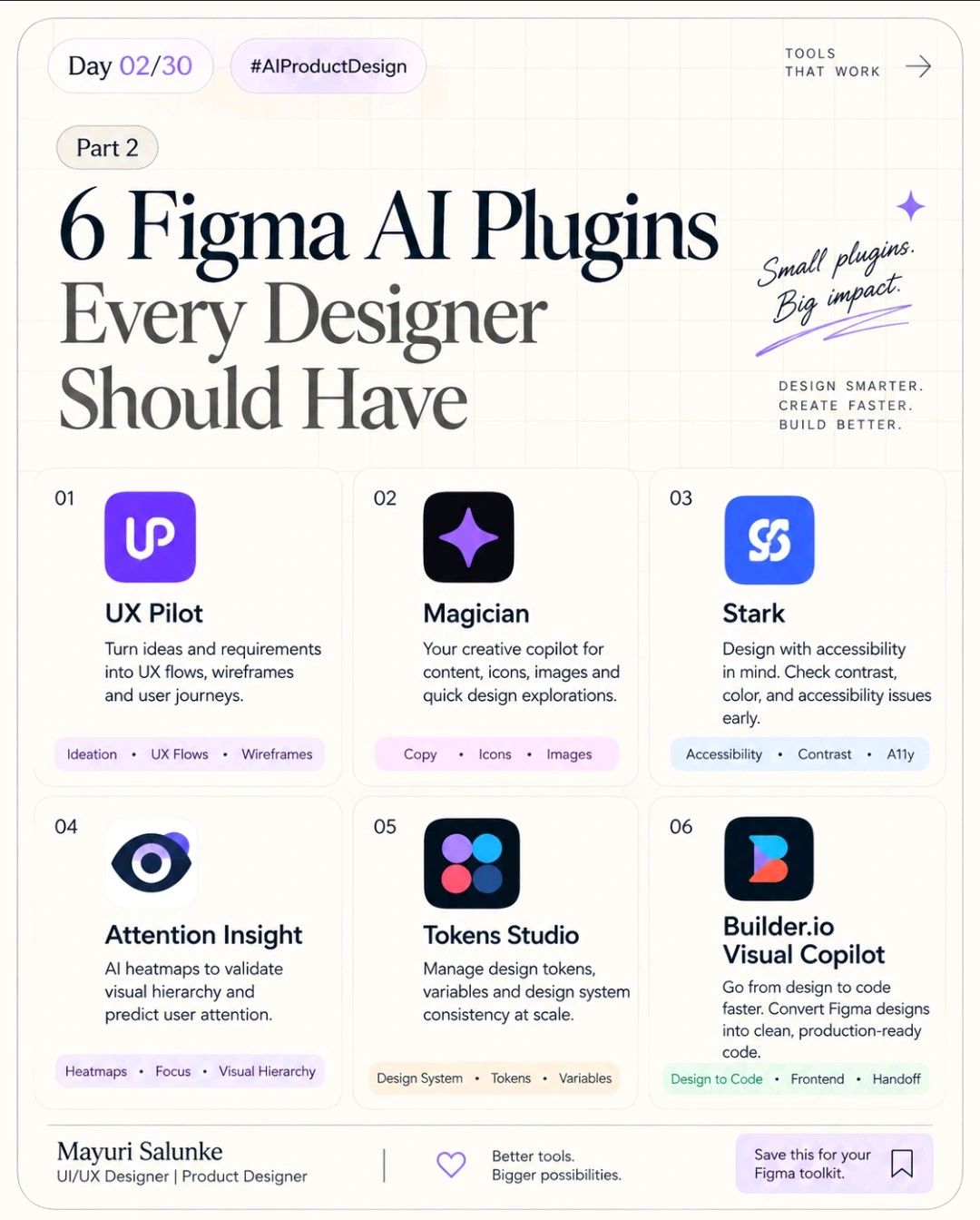
6 cool Figma AI plugins that every designer must have🌻 Most designers collect plugins. I’d rather keep 6 that solve real problems.🌻 After using AI across my product-design workflow, these are the Figma plugins I’d actually keep close: 1. UX Pilot AI — when I need to move from an idea/requirement to a usable UX direction quickly. UX Pilot AI link: https://uxpilot.ai/ 2. Magician — for the small creative tasks that interrupt flow: copy, icons, images and quick explorations. 3. Stark — my accessibility checkpoint. Contrast and accessibility issues are much cheaper to catch before development. 4. Attention Insight — useful when I’m questioning visual hierarchy. Its AI attention prediction gives me another signal before I spend time polishing a layout. 5. Tokens Studio — not flashy, but extremely valuable for serious design systems. It helps keep tokens, variables and design decisions structured instead of manually fixing consistency later. 6. Builder.io Visual Copilot — useful when the conversation moves from “this is the design” to “how do we actually build this?” and I want to reduce the gap between design and code. But here’s the important part: Plugins don't make you a better designer. Knowing when NOT to use them does. I still start with the problem, users, constraints and business goal. Then I decide where AI can remove mechanical work without removing design judgment.💜 That’s the shift I’m seeing in my own workflow: Less time pushing pixels → more time thinking, testing and solving. And honestly, that’s where AI becomes genuinely useful for Product Design.🌱 Which Figma plugin has earned a permanent place in your workflow?👇 #AIProductDesign #Figma #UXDesign #ProductDesign #UIDesign #DesignSystems #AIDesign #DesignWorkflow #aitools #aiindesigns #aidesigntools #juniordesigners #designcommunity #community #uiux #ai #learning #linkedin #creators #follow #learn
- LINKEDIN · IMAGESince 24 Oct 2026
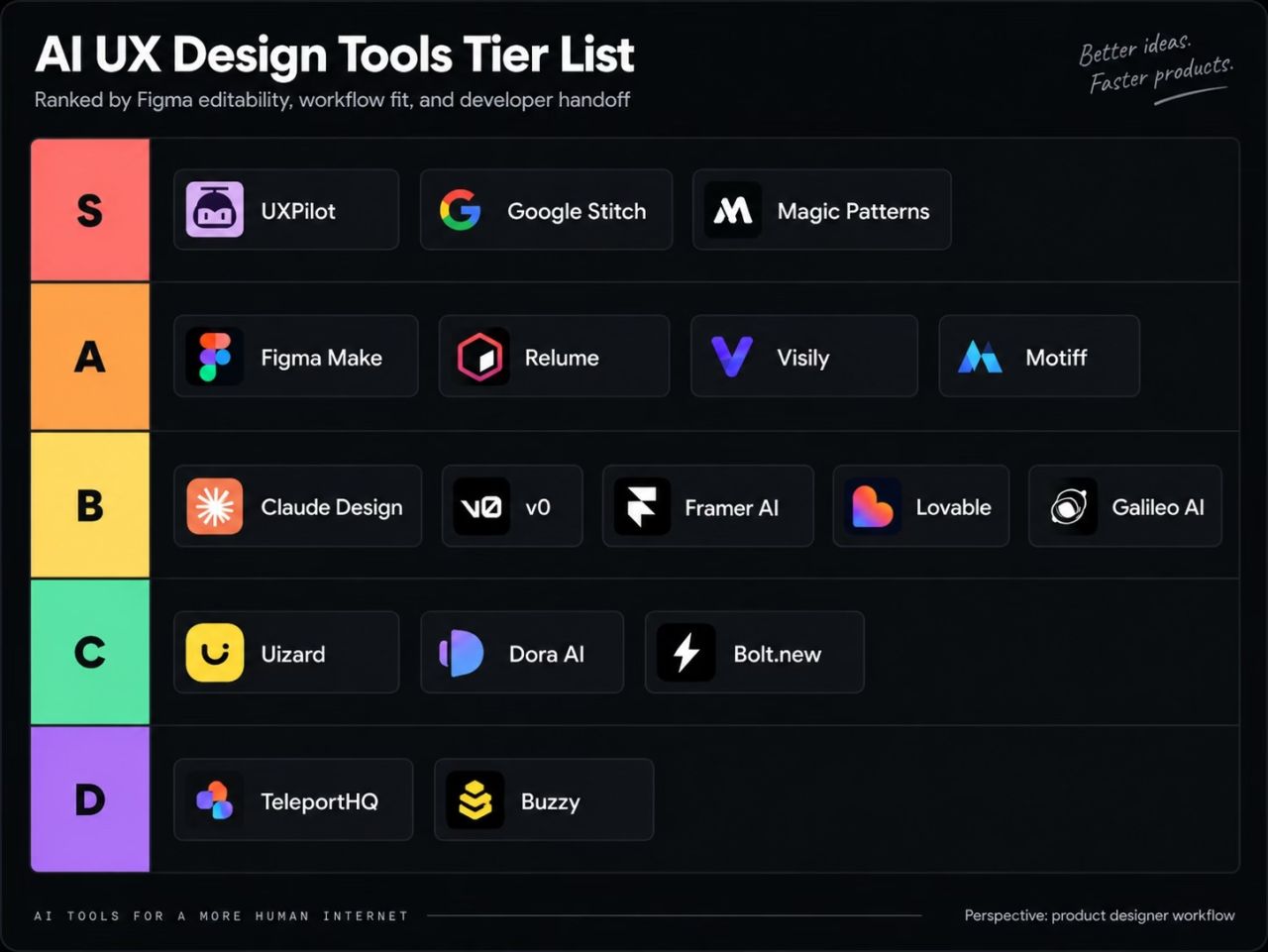
I ranked the AI UI/UX tools I’ve actually used… and I already know some of you are going to disagree. 👀 I ranked these based on how they fit into my actual workflow as a product designer with front-end experience. My main criteria were: • Can I edit the output properly? • Can I move it into Figma? • Can I work with real components/design systems? • Can I hand it off cleanly to developers? • Can I see or use implementation code? That’s why UXPilot, Google Stitch, and Magic Patterns landed in S Tier for me. UXPilot takes the top spot because it covers the full workflow: UI generation, variants, responsive designs, heatmaps, editable Figma export, Nodey inside Figma, and implementation code. Claude Design and v0 are powerful, but for my workflow, the Figma handoff still matters a lot. Relume, Visily, and Figma Make are strong too, especially depending on whether you’re focused on websites, rapid ideation, or prototyping. This isn’t “best AI overall.” It’s simply: which tools fit best into my workflow from design → Figma → handoff → build. Try UXpilot for free with the link below and let me know which one I ranked too high… and which one I disrespected? 👀 https://lnkd.in/gM4hti_3 #UXDesign #ProductDesign #Figma #AIDesign #UXPilot #DesignTools #Frontend
- LINKEDIN · VIDEOSince 24 Oct 2026
🪄 Product Designers just got the best creative companion of 2026 I’ve recently tested Glide, the latest AI model that promises to generate more diverse and out of the box UI designs that don’t look like the generic stuff we see everywhere these days. What I really like about this tool is that (1) Glide was trained exclusively on the best UX/UI design, not on the whole web. And because (2) it is rewarded for coming up with more diverse outputs, not for making things look functional. Turns out, this makes every design look more unique! I also want to highlight one small but important detail: Glide simulates the actual process a UI designer follows while creating an interface. This makes the entire experience feel much more human. 👉 Try Glide yourself: https://lnkd.in/esc-rigB
- LINKEDIN · VIDEOSince 24 Oct 2026
Stop using Claude for product design. Claude is great for hundreds of things. But for design, it's still a generalist. Yes, it can design. It just won't be the best tool for it, and most of the time you'll get something generic back. What Claude is genuinely excellent at is context. So try giving it product context: the user, the problem, the constraints, the annoying edge cases. Then, instead of asking Claude to design it, send that straight into a specialist tool like UX Pilot AI. It connects seamlessly, and instead of generating screens off a single prompt, it works from everything Claude already knows. Maybe the prompt isn't a prompt anymore. Maybe it's the whole conversation. Try it yourself, link in comments. #UXpilotai #UXpilotaipartner
- LINKEDIN · VIDEOSince 23 Oct 2026
🚨 Announcing the new UX Pilot Motion! Just paste your website url, upload docs, and give some direction. Shortly after you'll get a motion design video you could use for: > Product Launches; > Explainer Videos; > Product Demos; > Logo Animations; > Kinetic Typography; > UI Animation; > Video Ads; > Animated Chart Numbers; And more! You can also start from one of the 300+ unique templates. All easily editable inside the canvas and ready to export once it's perfect. Give it a try, it's free to start: uxpilot.ai/motion PS: This video was made using only UX Pilot Motion - want to see how? 👀
6 of 749 adsSign up to see every UX Pilot AI ad, filter by format and date, and get alerts on new ones.
See all 749 adsWatch the companies you care about.
Filter every ad by industry, country, format and network, and get alerts when a company you watch starts running new ads.