Not on air · 3 of 3 networks checked
Sitechecker
- sitechecker.pro
- Technology, Information and Internet
- EE
- 10 employees
Sitechecker’s ads on LinkedIn, Meta and Google, recorded by adsrunning. Browse the latest here for free. Sign up free to see all 951. Watch Sitechecker with Starter to get each new one in your feed.
Watchlist with Starter · $49/mo
| Network | Status | Live ads | Nov 2025LinkedIn activity · 52 weeksNov 2026 | Checked | Next step |
|---|---|---|---|---|---|
| None recorded | 0 | Checked 1 Nov 2026 | See all 951 ads → | ||
| Meta | None recorded | 0 | No active ads recorded on the Meta Ad Library | Checked 25 Oct 2026 | Collect them with the API → |
| Recently | 7 | Ads on the Google Ads Transparency Center | Checked 9 Oct 2026 | Collect them with the API → |
Sitechecker has no live LinkedIn ads. Its Facebook page had no active ads on 25 Oct 2026, and we recorded 7 Google ads on 9 Oct 2026.
Latest ads
- LINKEDIN · VIDEOSince 30 Oct 2026
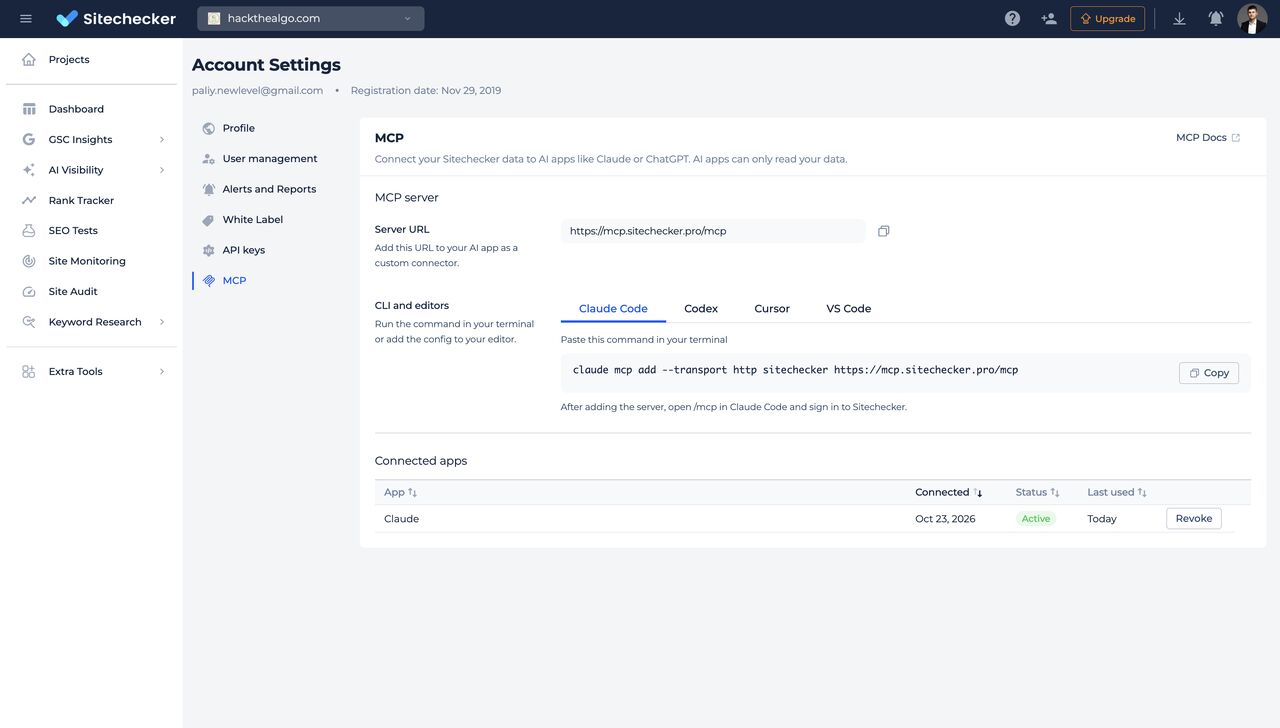
Building your own SEO reporting with MCPs feels amazing for about 2 weeks. No devs, no SaaS bill that goes up every year and you built it yourself. Then the 6th client signs, then the 15th client. Every client means more wires: GSC, GA4, rankings, AI visibility, site health, content changes. Separate connectors, separate auth, separate API limits. And suddenly you’re the guy who: - fixes a connector that silently broke; - explains to a client why last week’s numbers changed; - is the only person on the team who knows how it all works. When we polled our customers about building reporting with AI, the AI wasn’t what broke, the data connections were. So we built Sitechecker MCP: one connector instead of five, for every client site. Pipe it into Claude Code, ChatGPT Codex or your own tools. Keep the AI. Lose the wires. P.S. Book a demo to try it for free https://lnkd.in/gti26kdv
- LINKEDIN · IMAGESince 29 Oct 2026
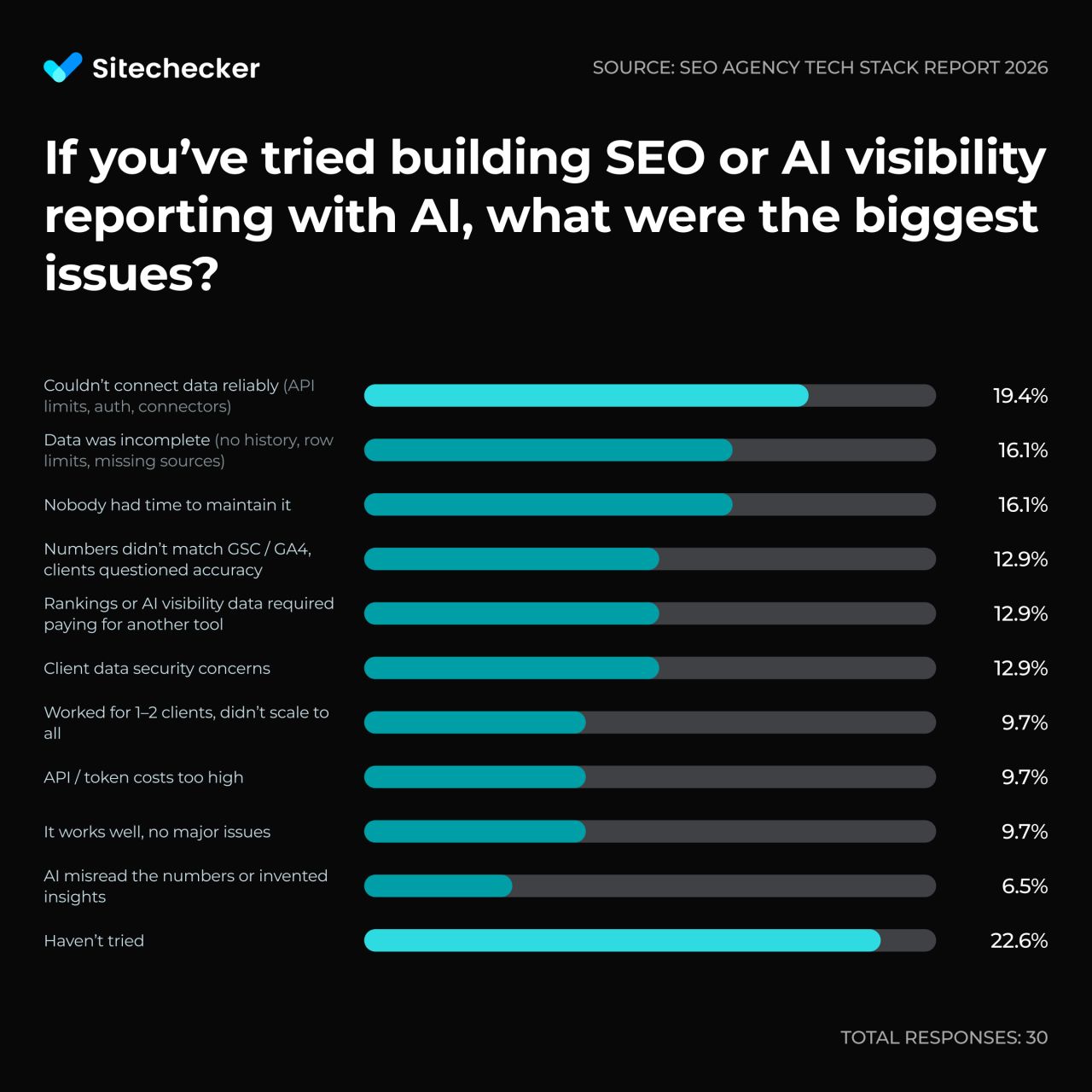
A DIY SEO reporting stack built on AI looks cheap on paper. We asked 30 SEO agencies how it went in practice. Of the 24 that tried, only 3 say it works with no major issues. The biggest issues: 1. Couldn’t connect data reliably → 19% 2. Data was incomplete (no history, row limits) → 16% 3. Nobody had time to maintain it → 16% 4. Numbers didn’t match GSC/GA4 → 13% That’s why we built the Sitechecker MCP. Connect it to your AI and it gets GSC, GA4, Google rankings, AI visibility, site health and content changes data from one source. Forget about broken connectors and missing history. Keep building reports with AI. Let Sitechecker feed it the data. Book a demo to try it for free -> https://lnkd.in/gti26kdv
- LINKEDIN · IMAGESince 26 Oct 2026
Sitechecker MCP is live (GSC, GA4, rankings, AI visibility & site changes). 5 reasons it beats DIY MCP setups: 1/ The numbers are correct When you connect Search Console to AI assistant directly, the AI receives only the top rows of your data. Google also hides anonymized queries. So when you ask for last month’s clicks or CTR, the AI adds up an incomplete list and gives you a number that looks right but isn’t. In Sitechecker, totals are calculated on our side, the same way the Performance report does it. The AI gets the final number and just explains it. 2/ Most of the analysis is already done We calculate page segments, keyword cannibalization, new and lost keywords, and GSC + GA4 conversions in advance. You set up segments once in Sitechecker, and they work in every chat. Without this, the AI has to pull thousands of raw rows and rebuild the same logic every time you ask, and that’s where most made-up insights come from. 3/ You get history that Google doesn’t store Search Console doesn’t record your daily rankings, whether you appeared in AI Overviews last month, which pages ChatGPT cited, or what changed on a page before traffic dropped. Sitechecker records all of this. So when a client asks why traffic fell, your AI can check what changed on the site and in the SERP during the same week. 4/ All client sites in one place If you manage 20 sites with separate MCPs, the AI has to figure out which GSC property, GA4 property and rank tracker project belong to the same client. In Sitechecker, each client is one project, with all data sources already connected to it. You just name the site. 5/ Setup takes one URL The official Google Analytics MCP needs a Google Cloud project, enabled APIs, credentials and Python on your machine. Other tools need their own API keys. With Sitechecker, you paste one server URL into Claude, ChatGPT, Cursor or Codex and sign in with your account. Want to try it for free? Book a demo -> https://lnkd.in/gti26kdv
- LINKEDIN · IMAGESince 26 Oct 2026
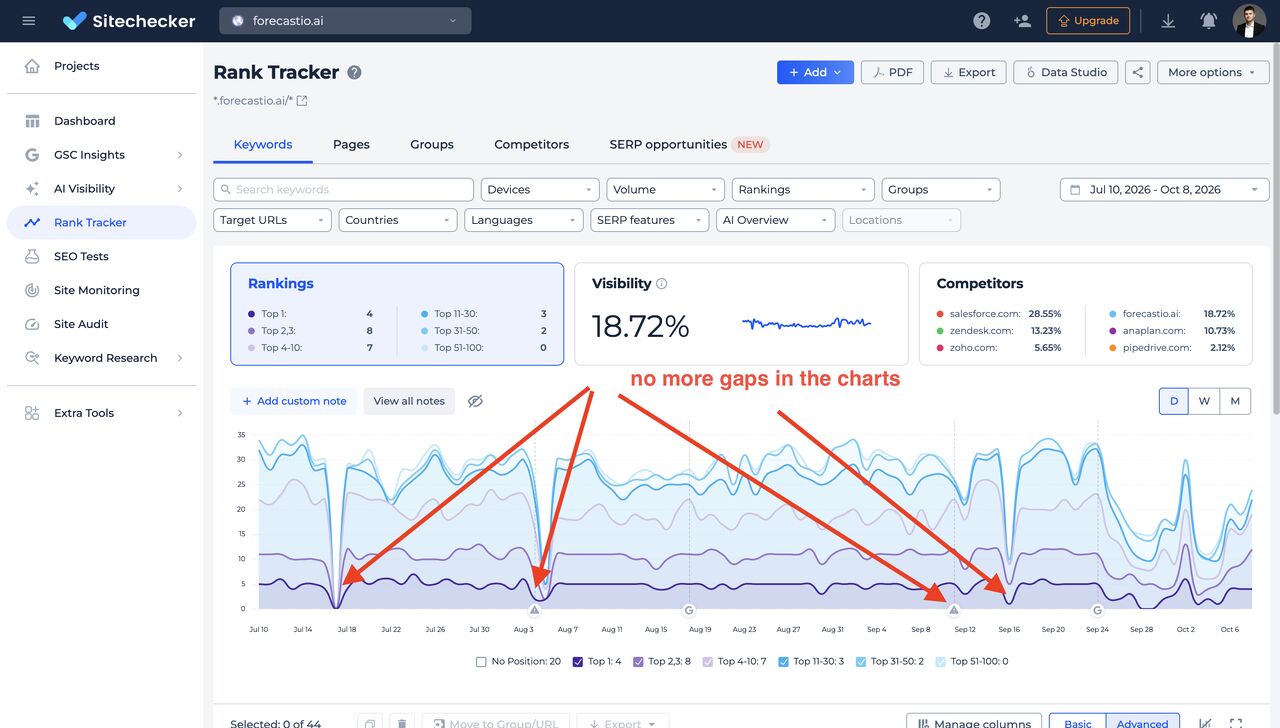
Does your tool still have issues with Google SERP tracking? If yes, consider switching to Sitechecker. Here are 2 reasons why: 1/ We had bad days too, but found a solution and continue tracking Google's top 100 every day (with SERP features and AI overviews). 2/ We are building a defence against the next pitfalls Google will definitely create. It means preparing to the cases, if SERP tracking will be x2-x10 expensive for anybody. a) creating a maximum flexibility of tracking, you'll be able to choose: - scraping the top 100 for the same set of keywords but less frequently - scraping only the top 10–20 but doing so every day - adding option to launch and save fast manual SERP checks b) using Google Search Console data to the full Yes, GSC doesn't replace traditional Rank Tracker because: - you don't have SERP data - you don't have position data for today - you won't see top 50-100 positions for many keywords - you can't track position in local search - you won't get a position data on some days for many keywords, because of low search volume However, average position metric by keyword is still very valuable because you can catch the bigger picture of what's going on with rankings of YOUR website, tracking it daily by 1k keywords per project easily! In such GSC Rank Tracker you'll also be able to set up a target URL, divide keywords into clusters, and see search volume and CPC data for them. Want to see it in action? Let's talk -> https://lnkd.in/gti26kdv
- LINKEDIN · IMAGESince 16 Oct 2026
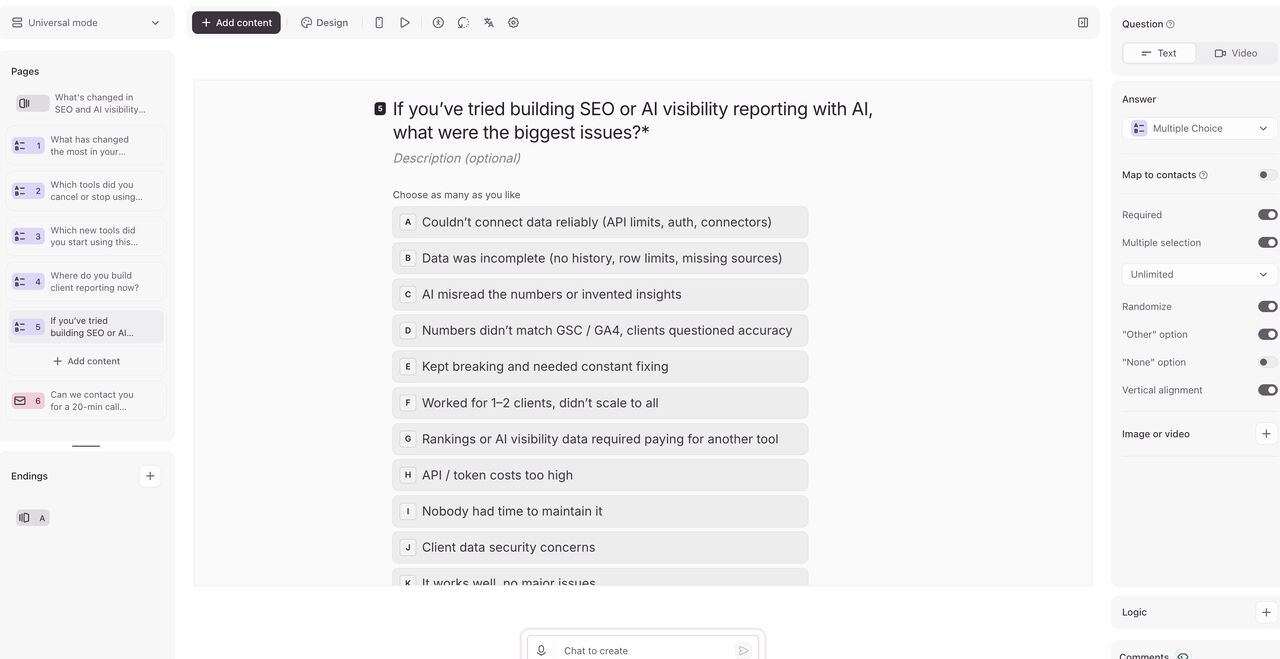
What's changed in SEO and AI visibility reporting at your agency over the last year? Some have built their entire reporting process using AI and cancelled popular SEO platforms. Others have tested AI but returned to their previous tools. If you are curious about how reporting approaches have evolved at other agencies, or if you are facing significant challenges in this area, please take part in my survey. https://lnkd.in/dkAz9HBp I've created a short survey with 5 questions (each with a ready to choose list of answers). - What has changed the most in your delivery and operations this year? - Which tools did you cancel or stop using this year? - Which new tools did you start using this year? - Where do you build client reporting now? - If you’ve tried building SEO or AI visibility reporting with AI, what were the biggest issues? Take 2 minutes to take part and find out how reporting is changing among SEO agencies.
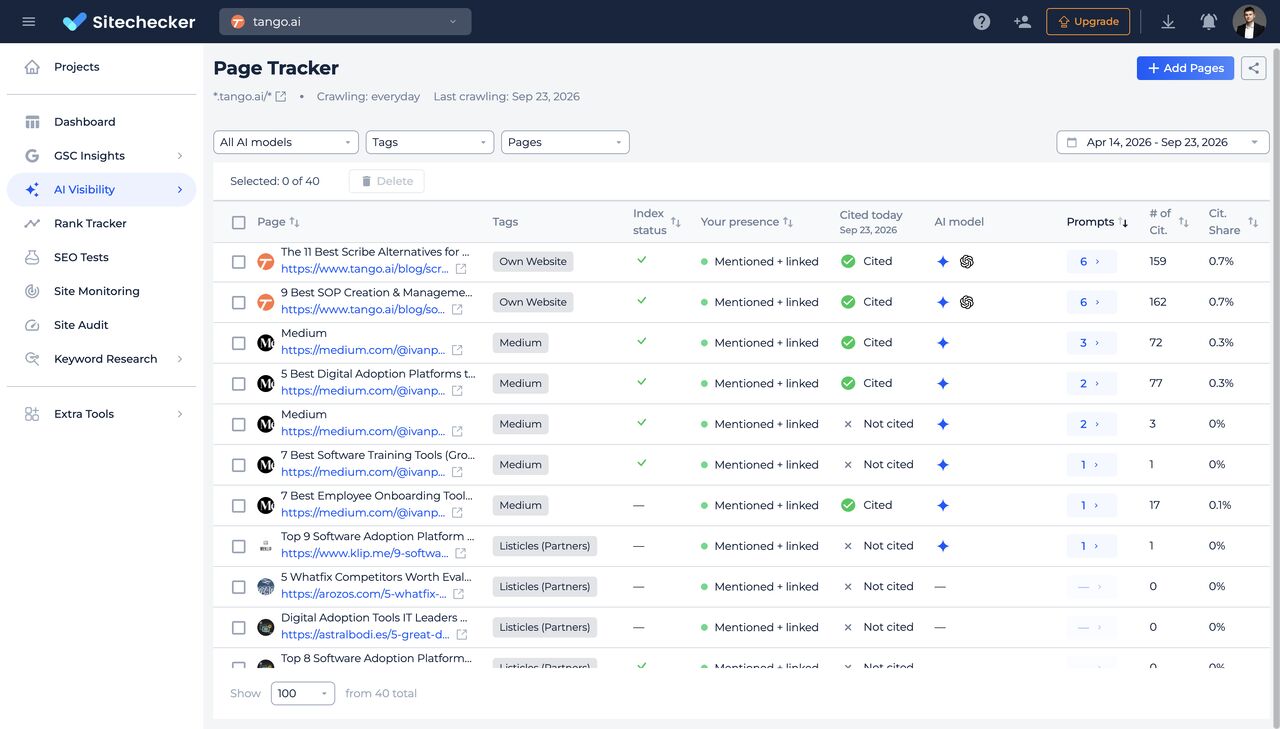
- LINKEDIN · IMAGESince 23 Sept 2026
AI Visibility Page Tracker is live at Sitechecker Here is why this a must-have for AI search analytics in your agency. Most of your work on improving brand visibility in AI is quite simple: 1. You look for what type of URLs and specific URLs are cited by LLMs by prompts you track. 2. You look for gaps on customer's site, UGC sites, and thirdy-party sites. 3. You create a plan of what content create/update on website + what content create on UGC sites + what sites to outreach to build brand mentions. 4. You monitor whether all the pages you've created/updated were indexed and started to cite by LLMs and whether it helped to improve brand visibility by specific prompt. If your AI search tracking tool doesn't have a Page Tracker, then monitoring part became too complicated. With Page Tracker you add each URL to monitoring and can clearly see whether: - it's indexed in Google at all (first important step to appear in AI Overviews and Gemini) - you have a brand mention only or brand mention + link - what's the URL citation dynamics (is it cited only 1-2 times or constantly cited) This is the best possible way to see what works for you and present all inputs to your customers and show how each page helped. There are also 2 features that make our Page Tracker unique: - option to add tags or groups - Google indexability check If you know another tool that does the same, let me know. P.S. Yes, I know, you'll say that LLMs cite URLs post factum, and if the brand is mentioned on URL, it doesn't guarantee that brand will be recommended. But my experience says that the approach works well enough. You don't have other possible inputs to impact LLMs than distrubute the same message on URLs they use as sources. If you disagree, let's discuss it. P.P.S. https://sitechecker.pro is the only AEO reporting tool, that includes AI search analytics + GSC/GA4 insights + Rank Tracking + unlimited users + full white label.
6 of 951 adsSign up to see every Sitechecker ad, filter by format and date, and get alerts on new ones.
See all 951 adsWatch the companies you care about.
Filter every ad by industry, country, format and network, and get alerts when a company you watch starts running new ads.